High-precision Curve Voltmeter and Ammeter, HP LENOVO DELL Type-C DC Adapter Boot Box
£84.24 – £92.88Price range: £84.24 through £92.88
High-concerned chemical: None DIY Supplies: Electrical Origin: Mainland China Certification: NONE modname=ckeditor Key instructions 1. Press briefly to switch interfaces. Press and hold for 3 seconds to clear the current base. Press and hold for 5 seconds to clear the base values of voltage and current. 4. Unplug the power input terminal. The USB-C power supply requires power […]
Description
Additional information
Reviews
Description
- High-concerned chemical: None
- DIY Supplies: Electrical
- Origin: Mainland China
- Certification: NONE
modname=ckeditor
Key instructions
1. Press briefly to switch interfaces.
Press and hold for 3 seconds to clear the current base.
Press and hold for 5 seconds to clear the base values of voltage and current.
4. Unplug the power input terminal. The USB-C power supply requires power supply. Press and hold for 5 seconds to restore the voltage and current readings.
5. Double-click: Pause/Resume waveform refresh
6. Triple Strike: Loop to switch the data refresh rate. 50/25/10/1HZ cycle switching.
What is clearing the base number?
Answer: For instance, if the standby value of a laptop is 0.003, long press for 3 seconds to clear the current base, and the standby value will display 0.000. When the switch is pressed, there is a current jump, which is the current after the device is turned on. The advantage lies in repairing those machines where there is only a slight change in the startup current. Screeni
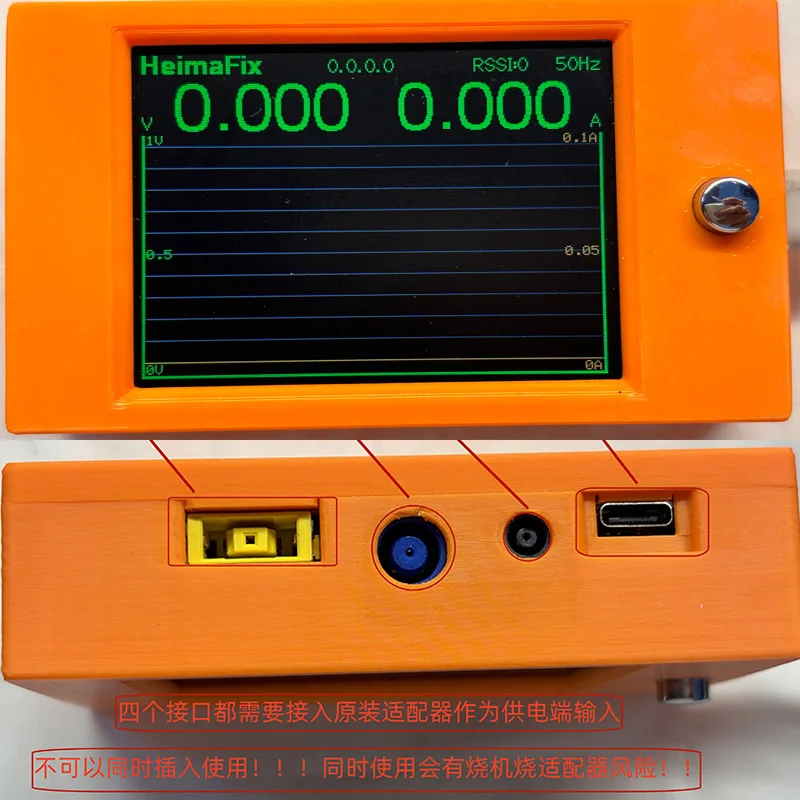
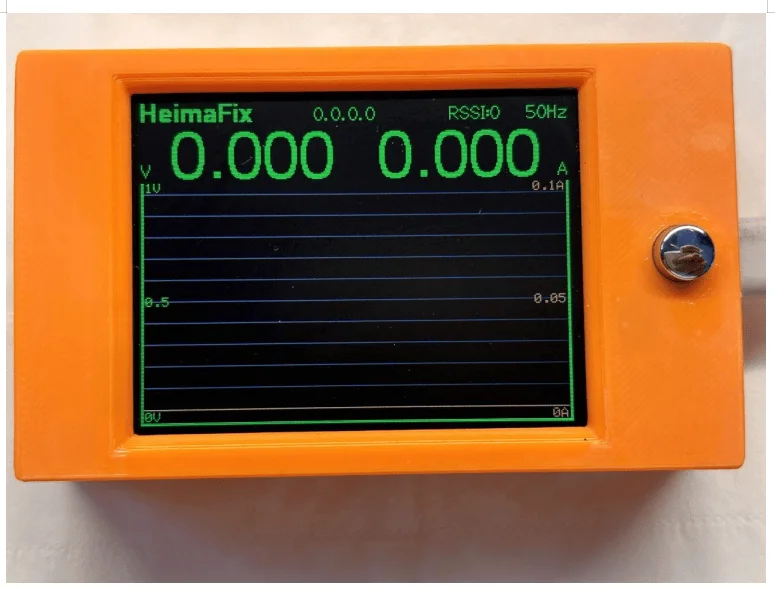
Screen interface description
Heimafix is the name of the Wi-Fi connection.
2.0.0.0.0 is the IP address before going online. After a correct connection, the correct IP address will be obtained, for example: 192.168.1.143.
3.RSSI: Here it represents the network signal strength. This is related to factors such as the environment and the distance of the router. It is not guaranteed that everyone can have a smooth Wi-Fi connection. If the online connection fails according to the online tutorial, this function will be abandoned. This function does not serve as any reason for returns or refunds.
4. V in the curve: Each cell represents 0.1V. This will automatically change the voltage value represented by each cell according to the detected voltage value.
5. A in the curve: Each cell represents 0.01A and will automatically change the current value represented by each cell according to the detected current value.
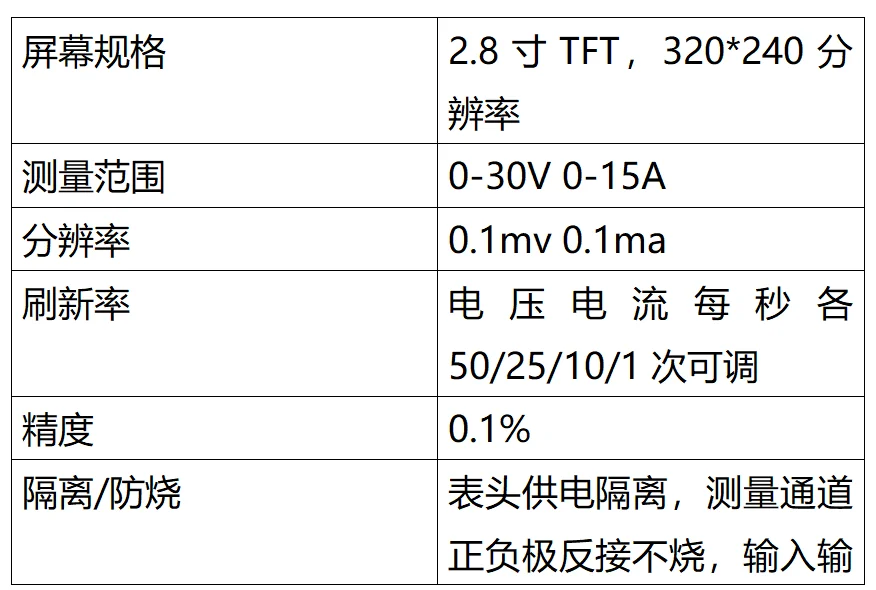
6.50HZ: Refresh rate. The voltage and current can be adjusted 50/25/10/1 times per second respectively
Product appearance dimensions: Within ± 0.5MM tolerance.
Length: 96MM
Width: 57MM
Height: 26MM
Product weight: 100 grams plus or minus 5 grams.
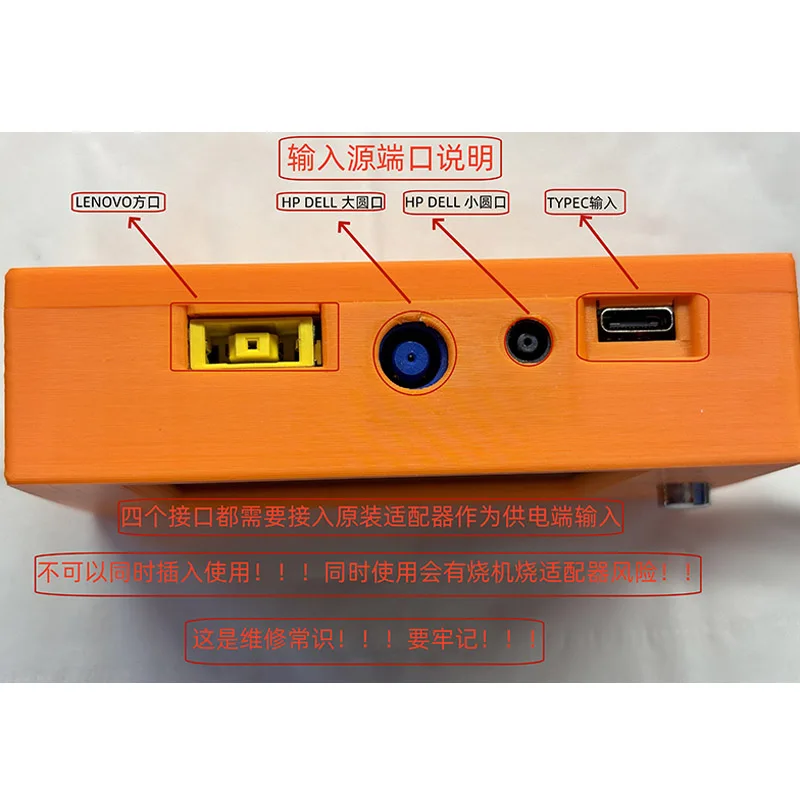
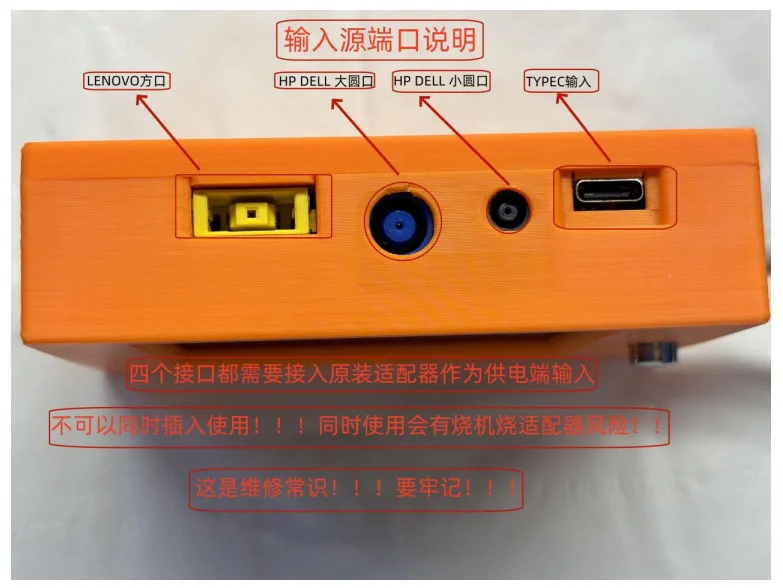
Input source port description:
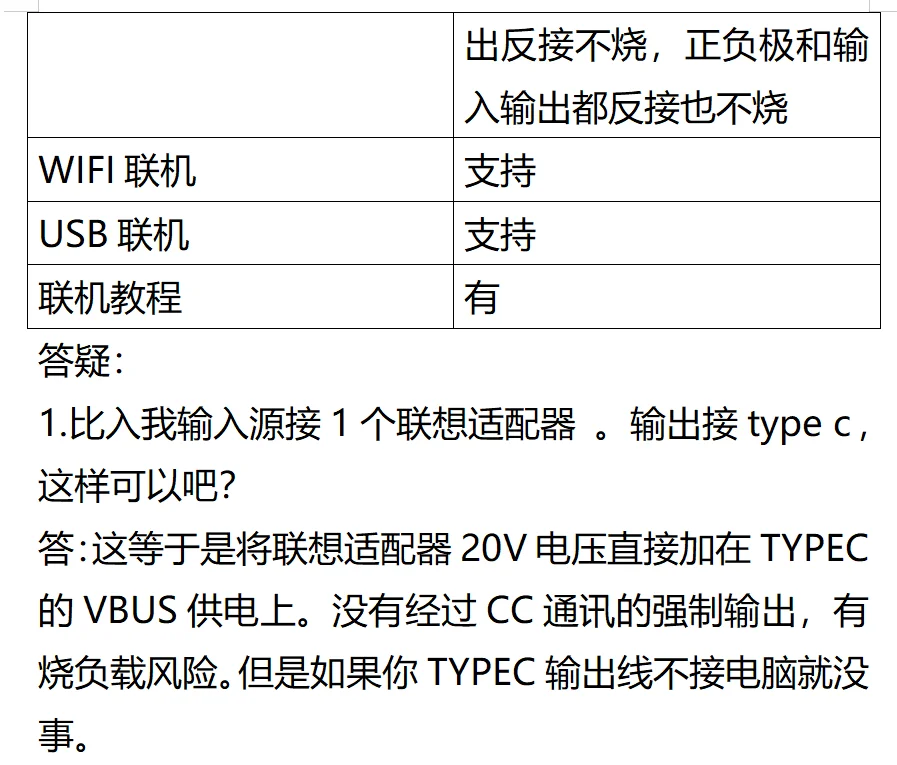
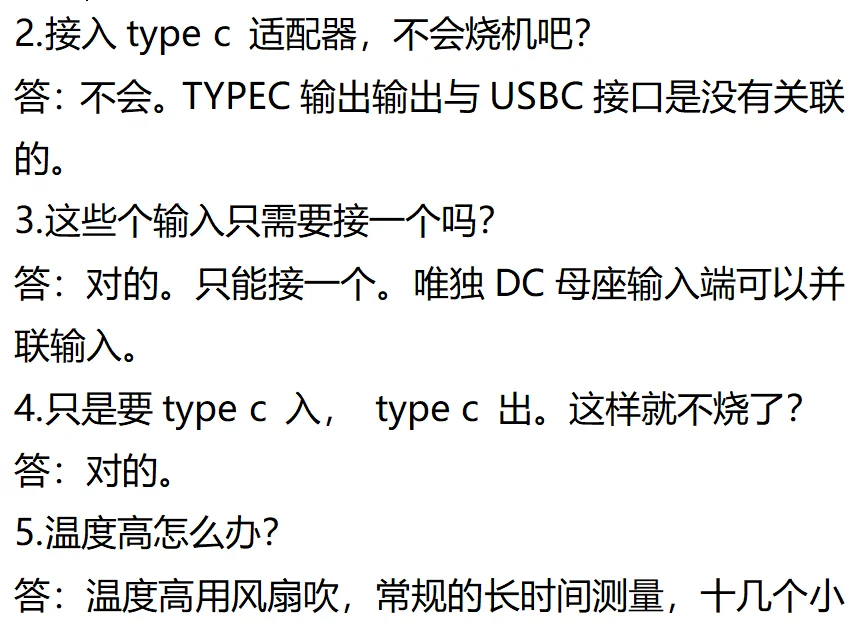
The middle pins of HP, DELL and LENOVO are connected together. The positive and negative poles are also connected together. So they cannot be inserted simultaneously. For instance, when the middle pin of the HP adapter is not connected to the motherboard, it is a 19V floating voltage. If a DELL adapter is connected at this time, the 19V middle pin voltage will be supplied to the DELL power transistor DS2501, which will burn out the DELL adapter.
When a Type-C adapter is inserted, there will be no voltage detection at all. However, some mobile phone chargers may detect a 5V voltage. Type-c requires CC communication before it selects one of the matching voltages, 5V, 9V, 12V, 15V, or 19V, for input. Part 1: English Simplified
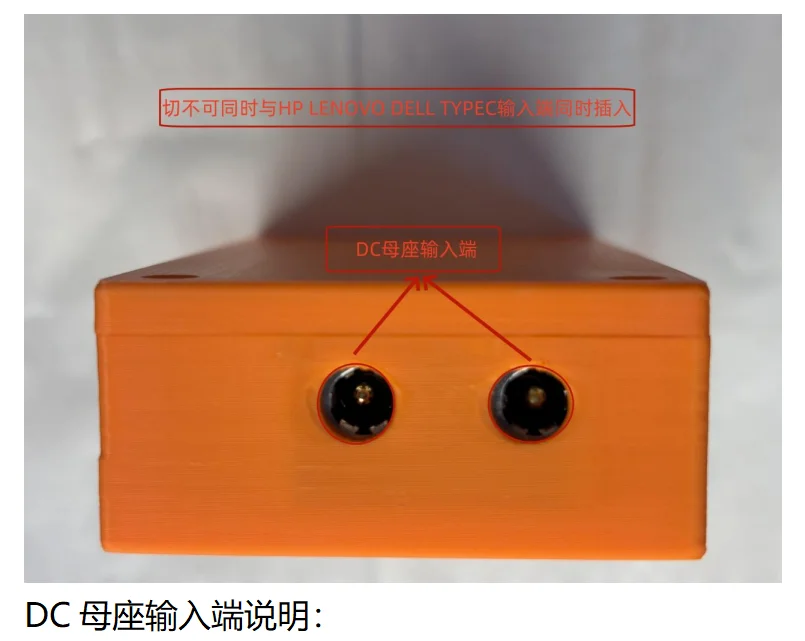
DC female socket input terminal description:
Both female sockets are of 5.5*2.5 specification.
Both female sockets can be plugged into adjustable power supplies. The input voltage value is 21-22V. It is used in parallel with the input terminal. The input voltage value must be precisely adjusted to the same value before insertion.
3. The current can be connected in parallel. For instance, if one unit can be adjusted to 10A and the other to 5A, then 15A can be output in parallel. For instance, if both units are adjustable to 10A, they can output 20A in parallel.
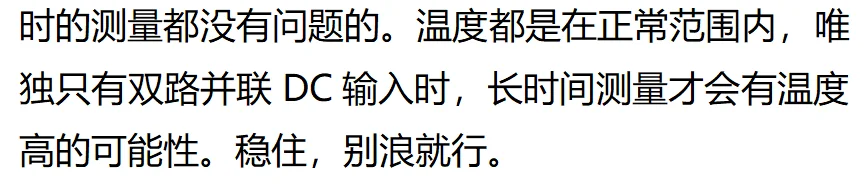
4. If you need to use the parallel output for a long time, such as conducting intense testing for several hours, it is recommended that you disassemble the casing and DIY the heat dissipation yourself. This store does not provide DIY heat dissipation materials. Just find the heat sink and install it yourself.
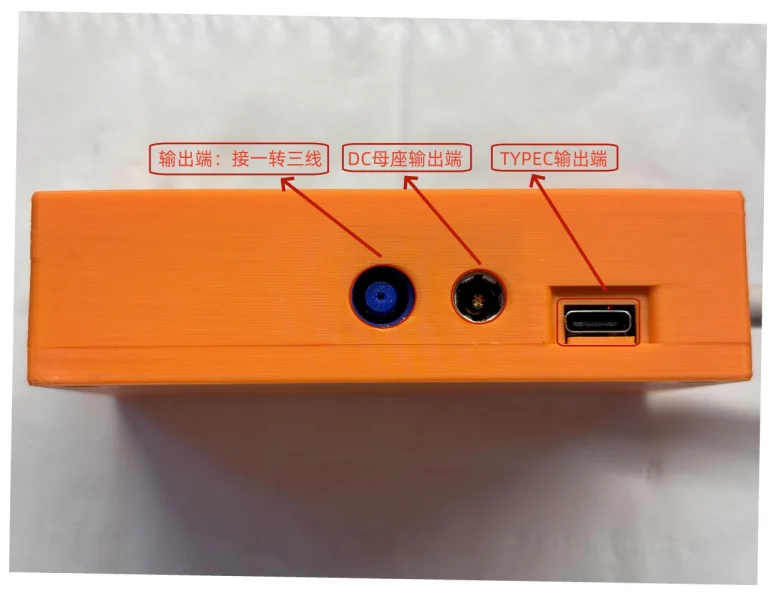
Output terminal interface description
For the Type-C output terminal, power cables with EMARK chips cannot be used. Because many technicians will insert 100W or 140W Type-C adapters at the input end, the cables of these adapters have EMARK chips inside, so using EMARK cables at the output end will conflict, and only one side can be used. “Yan Shu”
2. Selection of Type-C output cable
① : A Type-C data cable can be chosen. The current of this type of wire is generally not too high.
②: You can purchase Type-C male connectors and make them yourself. The power of the wire can be freely determined.
3. Output terminal: Connect one to three wires. Make sure it is inserted tightly. Many people like to insert half of the needle and keep the other half, then come to question why it doesn’t work. Will the intermediate needle at the output end be the intermediate needle at the input end
4.DC female socket output terminal: The cable must be selected with high current capacity.
5. Regarding the voltage attenuation of the wire. For instance, if the displayed detection voltage is 20.6V, after being connected to the mainboard, the actual measured supply voltage is only 20V. This is the attenuation of 0.6V.
6. Solution to Voltage attenuation
①: Replace it with a better quality adjustable power supply. Or an adapter.
② : Use wire of better quality
③ : Shorten the wire.
④ : The adjustable power supply can appropriately increase the input terminal voltage.
7. Can all the wires be inserted into the output terminal?
Answer: Yes, but don’t connect multiple devices at the same time. Non-multi-channel acquisition curve table.
8. Under what circumstances would a computer burn out?
Answer: If the input end is connected to an adjustable or adapter and then the Type-C output end is connected to a computer, it will burn out the computer.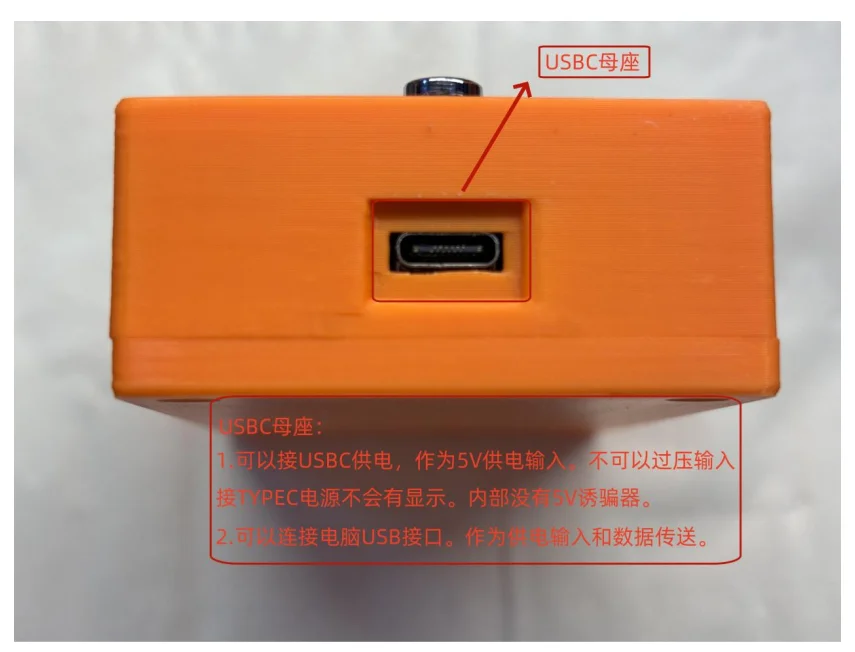
Usb-c female socket description
As a power supply terminal, it is used to supply power to the screen module. This power supply must be connected; otherwise, there will be no display on the screen. The power supply is at a voltage of 5V. Do not connect wires with built-in traps at will. If they burn out, please hide it yourself and do not mention it. thank you. When the Type-C adapter is inserted into the USB-C power female socket, it won’t burn out, but it won’t display. A Type-C adapter with a minimum output of 5V can be used for power supply.
For online connection, a USB-C cable can be used to connect to the USB port of the computer for data transfer.
Do not insert a USB flash drive through port C. It cannot be used for saving curves. Please save the curve via a computer.
Additional information
| Attributes | Value |
|---|---|
| Color |
Ammeter, Ammeter with cable |
| High-concerned chemical |
None |
| DIY Supplies |
Electrical |
| Origin |
Mainland China |
| Certification |
NONE |
Reviews
0 reviews for High-precision Curve Voltmeter and Ammeter, HP LENOVO DELL Type-C DC Adapter Boot Box

High quality
100% Genuine
Related Products
-
-
-
DFN8 QFN8 WSON8 to dip8 Chip Probe Line Read and Write Burning Needle 1.27 6×8 6X5
£20.46 – £37.64Price range: £20.46 through £37.64